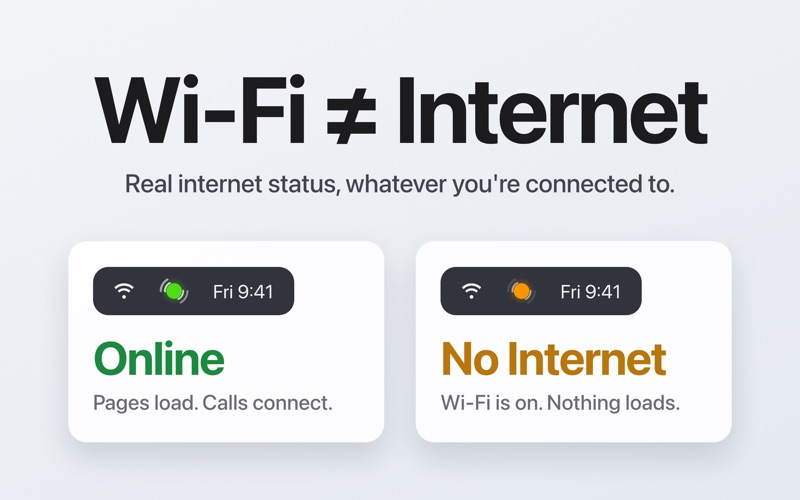
Your Mac says "Connected." But is your internet actually working?

Reachable lives in your menu bar and gives you a clear answer — a colored dot that's green when you're online, orange when there's no internet, and grey when you're not connected to any network. Unlike other apps, Reachable knows the difference — a WiFi outage isn't the same as turning off your WiFi. When your connection drops, you get notified. When it comes back, you know.


OUTAGE HISTORY & PROOF

Every outage is automatically logged with precise timestamps, duration, and network details. Browse your full timeline — online, no internet, not connected, and every transition in between. See summary stats: uptime percentage, longest outage, total downtime. Switch to the calendar heatmap to spot patterns across weeks and months. Export a PDF report with a visual timeline, uptime stats, and a full breakdown of every event — or export as a spreadsheet. The evidence you need when your ISP says everything's fine.


AT A GLANCE

Click the menu bar icon to see today's uptime, outage count, and time monitored. See your public and local IP addresses (click to copy), WiFi signal strength, and response time. Optionally display your WiFi network name. See your current download and upload speeds in real time. Need a full speed test? One click opens your preferred provider — Speedtest.net, Cloudflare, or LibreSpeed.


SMART, NOT NOISY

- Confirms there's a real problem before alerting — no false alarms from brief blips, switching WiFi networks or waking from sleep
- Filter out brief outages so only real disruptions trigger notifications
- Stuck on a hotel or airport public Wi-Fi? Detects captive portals and helps you connect
- Recognizes mobile hotspots and adjusts accordingly
- Works correctly behind VPNs — detects when only virtual interfaces remain and reports the real connection status


MAKE IT YOURS

- Choose your ping target and test it live
- Pick from five alert sounds, or stay silent
- Three menu bar icon styles: monochrome, colored, or text pill
- Accessibility-friendly icons for color-blind users
- Control how long your history is kept — from 7 days to forever
- Keyboard shortcuts for quick access


WIDGETS

Desktop widgets show your connection status and uptime percentage at a glance. The Medium widget adds a 24-hour outage timeline.


PRIVATE & SIMPLE

One-time purchase. No subscription. No hidden costs.
- No ads
- No tracking or analytics
- No popups, no interruptions, ever
- No data leaves your Mac — network requests carry no app name, no device ID, nothing identifiable


Launches at login. Lives in your menu bar. No dock icon. Localized in 10 languages, including English, French, German, Spanish, Japanese, Chinese, Portuguese, Italian, Korean, and Dutch. Built to feel like part of macOS.