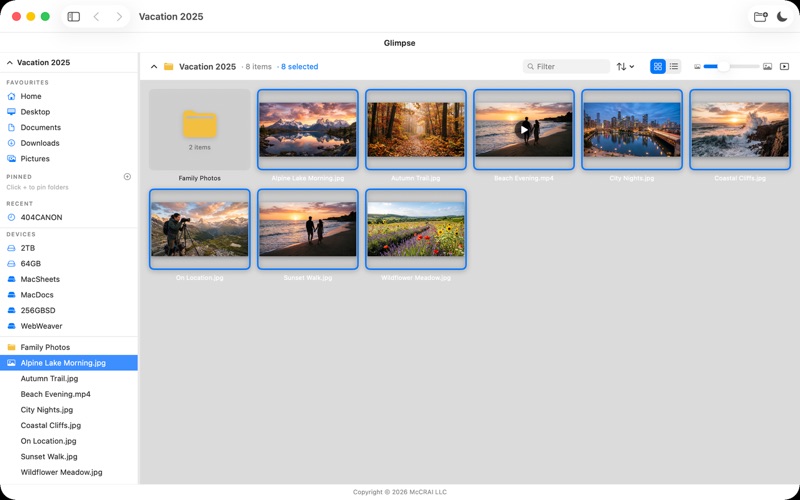
Glimpse Image Browser is the fast, clean, and privacy-first way to view, organize, and lightly edit every photo and video on your Mac
Glimpse Image Browser is the fast, clean, and privacy-first way to view, organize, and lightly edit every photo and video on your Mac. No cloud account, no subscription, no clutter — just your images, beautifully displayed.

**Browse your way**
Every image and video loads as a crisp thumbnail instantly, with folders shown as cards up top. Switch between the thumbnail grid and a details list, drag the size slider to resize thumbnails, and sort by name, date, size, or kind. Type in the filter field to narrow a folder in real time, or flip on Include Subfolders to browse an entire folder tree at once.

**Select and organize like Finder**
Click to select, Cmd-click and Shift-click to build a selection, Cmd+A for everything — then copy, share, export, rename, or trash the whole selection in one go. Apply macOS color tags right from Glimpse, batch-rename with automatic numbering, and undo an accidental delete with Cmd+Z. Pin your favorite folders to the sidebar and jump back instantly with the Recents list.

**Full-screen viewer with filmstrip**
Open any image in a smooth, distraction-free viewer. A filmstrip along the bottom lets you jump anywhere in the folder, and pinch-to-zoom, drag-to-pan, and keyboard shortcuts keep navigation fluid. Start a slideshow with one click — set the speed, shuffle, and loop, then sit back.

**Light editing, zero risk**
Rotate an image and save it permanently to JPEG, PNG, TIFF, HEIC, or BMP — metadata preserved. Crop with rule-of-thirds guides and save a copy, never touching the original. Export or convert anything (or a whole selection) to JPEG, PNG, HEIC, or TIFF, with optional downsizing for sharing.

**Video playback**
Glimpse plays MP4, MOV, and M4V right inside the app with full scrubbing and volume controls. Video thumbnails show a play badge so you always know what's a photo and what's a clip.

**EXIF data on demand**
Slide open the info panel to see camera, lens, exposure, and GPS details in clean sections. Photos with location data get one-click Open in Maps and coordinate copying.

**Light & Dark mode**
Switch instantly between a clean light interface and a rich dark mode. Your preference is saved automatically.

**Keyboard-first workflow**
- Arrow keys / Space — move between images
- ⌘+ / ⌘− / ⌘0 / ⌘1 — zoom, fit, actual size
- R / L — rotate, ⌘S — save rotation, ⌘K — crop
- ⌘E — export, ⌘C — copy, ⌘P — print, ⌘Z — undo trash
- ⌥⌘P — slideshow, Escape — back to the grid

**Wide format support**
JPEG, PNG, GIF, BMP, TIFF, HEIC, WebP, AVIF, JPEG XL, ICO, SVG, PDF, and RAW files from Canon, Nikon, Sony, Fujifilm, Olympus, Panasonic, Pentax, and Samsung cameras.

**Privacy by design**
Glimpse never connects to the internet. Your files never leave your device. No analytics, no telemetry, no account required. Period.