TRANSFORM YOUR VIDEO FOOTAGE WITH PROFESSIONAL TIMESTAMPS
PI Video Editor is the ultimate tool for organizing, timestamping, and merging video clips from dashcams, body cameras, surveillance systems,
TRANSFORM YOUR VIDEO FOOTAGE WITH PROFESSIONAL TIMESTAMPS

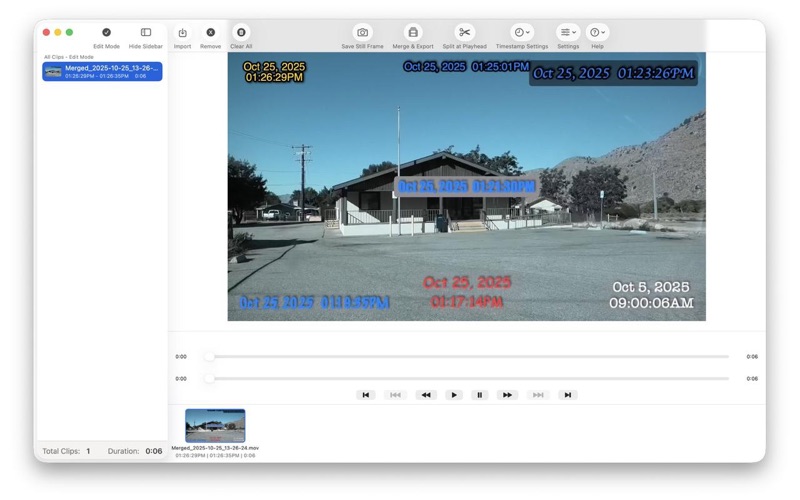
PI Video Editor is the ultimate tool for organizing, timestamping, and merging video clips from dashcams, body cameras, surveillance systems, and personal recordings. Add accurate timestamps to your videos and create a seamless timeline of events.

POWERFUL VIDEO EDITING
- Automatic chronological sorting by recording date and time
- Manual drag-and-drop reordering for custom sequences
- Split clips at any point with precision controls
- Remove unwanted footage with multi-select support
- Merge all clips into a single timestamped video

PROFESSIONAL TIMESTAMP OVERLAYS
- Burn-in timestamps directly onto your videos
- Choose from multiple display formats (date+time, time only, date only)
- Customize font, size, color, and position
- Add background boxes with adjustable opacity
- Bold, shadow, and outline text effects
- Show timestamps in 24-hour or 12-hour format
- Option to hide seconds for cleaner display
- Display time before date for alternative formatting

VIDEO ENHANCEMENT TOOLS
- Mirror and flip videos to correct reversed recordings
- Adjust brightness for over or underexposed footage
- Apply changes to multiple clips at once
- Live preview of all adjustments
- Hardware-accelerated processing for smooth playback

ADVANCED TIME MANAGEMENT
- Manual time adjustment for any clip
- Bulk edit timestamps for multiple clips simultaneously
- Quick presets for Daylight Saving Time corrections
- AM/PM reversal preset for 12-hour offset fixes
- Day adjustment shortcuts
- Reverse timestamp mode (count backwards)
- Automatic overlap detection and warnings

INTUITIVE TIMELINE INTERFACE
- Visual timeline with clip boundaries
- Thumbnail preview for every clip
- Large or compact thumbnail views
- Split-screen with video player and clip list
- Grouped by recording date for easy organization
- Search and filter capabilities
- Drag-and-drop video import

FLEXIBLE EXPORT OPTIONS
- Export to MP4 or MOV formats
- Hardware-accelerated encoding (H.264/HEVC)
- Optional audio stripping
- Custom save locations
- Progress tracking with cancel option
- Preserve or adjust video quality

PERFECT FOR
- Dashcam footage compilation
- Body camera evidence documentation
- Security camera incident reviews
- Multi-camera event reconstruction
- Personal video diaries with accurate timestamps
- Surveillance video organization
- Legal and insurance documentation
- Traffic incident reports
- Property monitoring logs

KEY FEATURES AT A GLANCE
- Automatic chronological sorting
- Manual timeline reordering
- Professional timestamp overlays
- Video brightness adjustment
- Horizontal video mirroring
- Bulk time editing with presets
- Multi-clip selection and editing
- Timeline overlap detection
- Large thumbnail preview option
- Split and merge operations
- Keyboard shortcuts for efficiency
- Undo and Redo support
- No watermarks or limits

PRIVACY FIRST
All video processing happens locally on your Mac. No internet connection required. Your videos never leave your device. No subscriptions, no ads, no data collection.

SYSTEM REQUIREMENTS
- macOS 13.0 or later
- Apple Silicon or Intel processor
- Supports all common video formats (MOV, MP4, M4V, and more)

Whether you are documenting incidents, organizing surveillance footage, or creating a chronological video diary, PI Video Editor gives you professional tools with an intuitive interface. Import your clips, let the app sort them automatically or arrange them manually, customize your timestamps, and export a perfectly timestamped video in minutes.

Download PI Video Editor today and take control of your video timeline.

SUPPORT
Have questions or feedback? Contact us through the app's Help menu or visit our support page. We are committed to making PI Video Editor the best tool for your timestamped video needs.