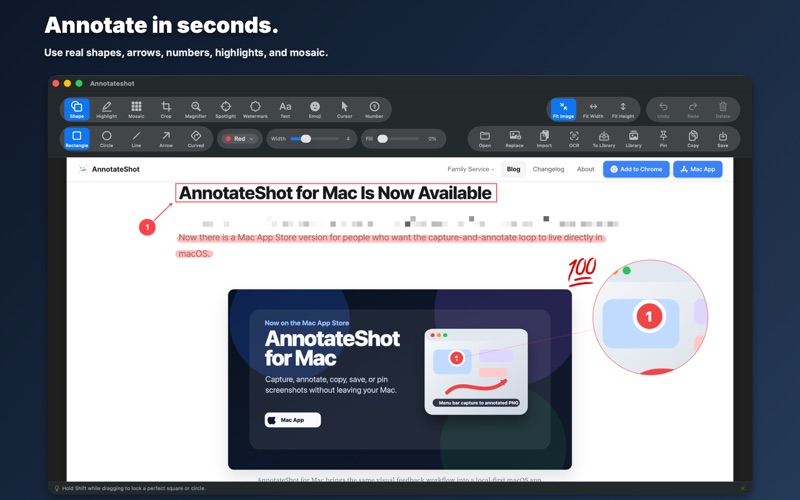
Annotateshot is a lightweight screenshot capture and annotation app for macOS.

Capture a selected area, a window, the full screen, or a scrolling region. For a long page, select the scrollable area, scroll through it yourself, and Annotateshot matches overlapping frames and stitches the content into one image.

Open the result in the editor to add arrows, shapes, numbered markers, text, highlights, mosaic effects, magnifiers, spotlights, emoji, cursor stamps, and watermarks. Then copy it, save it as PNG or JPG, pin it above other windows, or keep editable work in the local library.

Extract text from an entire image or a selected area with on-device Apple Vision OCR. Review the results, select recognized regions, and copy the text when you choose. Your image and recognized text stay on your Mac.

Free includes all core capture, annotation, recording, and OCR features. A one-time Pro upgrade removes the Annotateshot footer from external exports of scrolling captures. There are no subscriptions, trials, or accounts.

Key features:
- Capture areas, windows, full screens, and long scrolling regions from the menu bar
- Record an area, a window, or the full screen, then export MOV or GIF
- Annotate with arrows, shapes, text, numbers, highlights, mosaic, magnifier, spotlight, emoji, cursor stamps, and watermarks
- Extract text locally from an entire image or a selected area
- Copy, save, pin, and reopen editable captures from a local library
- Work in English, Korean, or Japanese and use built-in or Mac-installed text fonts
- Choose and remember a save folder and image format (PNG or JPG)

Screen Recording permission is used only when you start capture or recording.