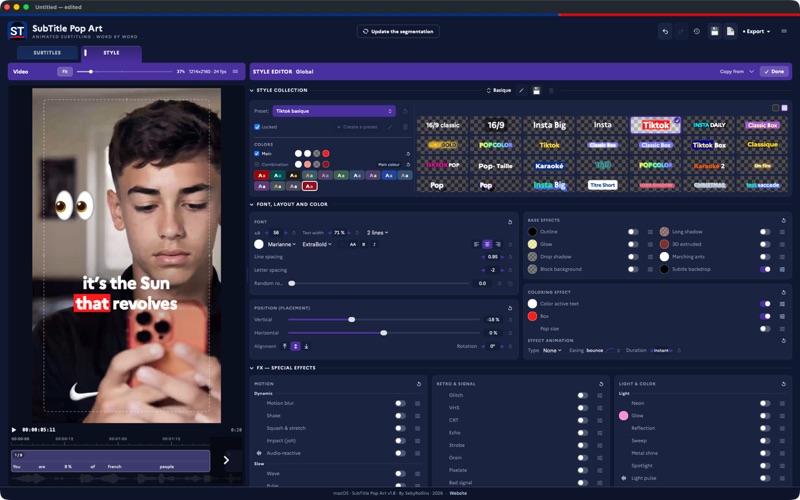
Subtitle editor for classic and social media. SubTitle Pop Art does both: the plain line-by-line subtitle of a 16/9 video, and the word-by-word karaoke animation you see on TikTok, Reels and Shorts. All on your Mac, and nothing leaves your machine.

Drop in a clip, get your text (transcribe it on-device or import an SRT/transcription), and every word pops in perfect sync with the audio. Then make it yours with a deep style editor and export a burned-in video ready to post.

WORD BY WORD, OR LINE BY LINE
• The classic subtitle: laid out line by line, with its characters-per-line and line-count rules
• Or each word appearing in time with speech, karaoke-style
• Active-word highlight, pop and reveal animations (typewriter, spring, flip, curtain…)
• Timing measured in the audio: forced alignment locks each word to the exact moment it is spoken — optional per-language models (~150 MB), downloaded from Settings. Realign the whole video, a single block, or a few words

STYLES & EFFECTS
• Ready-made presets (TikTok, classic box, karaoke and more)
• Fonts, colors, outline, glow, 3D, long shadow, gradients
• Special effects: motion blur, glitch, VHS/CRT, neon, chroma, rainbow, marching ants, audio-reactive
• Per-block overrides: position, zoom, rotation, colors, line count, vertical alignment (top, centre, bottom)
• Emoji dropped on the picture, synced to the block or to a word, with their own entrance, in front of or behind the text
• Matter animated inside the letters, filmed or computed
• A gallery of 27 presets; a project's styles can be saved as a collection, to reload in another project or to share

PRECISE EDITING
• Visual timeline with waveform, word blocks and a frame grid
• Split, merge, line-break and re-time words with the mouse, Option and Cmd as tools
• Segmentation rules (characters per line, line count); a block that exceeds them is flagged in red
• Word-by-word formatting: weight, italic, underline, size, line spacing, rotation — plus a random word rotation
• Multi-select blocks, and copy one block's style onto another

BRING YOUR OWN TEXT
• On-device transcription (speech-to-text), or
• Import SRT / VTT / word-level JSON — blocks and line breaks preserved

EXPORT
• Burned-in subtitled video: equivalent quality, high quality or lightweight review — plus a bitrate slider to hit a precise file size, the estimate updating live
• GPU rendering, word by word: fast exports, even in 4K with a heavy style
• Export subtitles as SRT, VTT, plain transcript or word-level JSON
• The subtitle track alone on a transparent background: ProRes 4444 alpha or PNG sequence

PRIVATE BY DESIGN
• Everything runs locally on your Mac — your videos never leave your machine
• Interface available in 6 languages (English, French, Spanish, Portuguese, German, Italian)

Make captions that pop — and keep every viewer watching.