
LabelPair
0.0 2.61MB 0 ¤8.00
Version 1.0
Updated 2026-09-22
Developer Code Blue Creations, LLC



Description
Most shipping labels come as a PDF with one 4×6 label on a full letter-size page
Most shipping labels come as a PDF with one 4×6 label on a full letter-size page. Print ten orders and you throw away ten half-empty sheets. LabelPair fixes that.

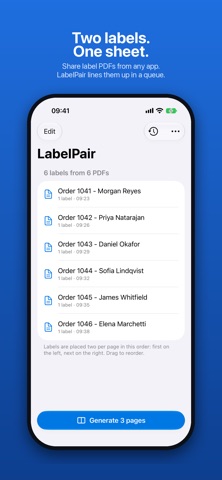
Share each label PDF to LabelPair from any app — your marketplace app, email, Files, Safari — and it waits in a queue. When you're ready, tap Generate. LabelPair places the labels two per page, side by side, and hands you one clean PDF to print or share. Half the paper, no cutting guides, nothing to line up.

HOW IT WORKS
• Tap Share on any label PDF and choose LabelPair. Repeat for every order.
• Open LabelPair. Your labels are listed in order — drag to reorder, swipe to remove.
• Tap Generate. Labels are paired left and right on pages that match the original size and orientation.
• Print with AirPrint or share the PDF anywhere.

WHY LABELPAIR
• Works with any app that can share a PDF. No integrations, no account linking.
• Handles multi-page PDFs — every page becomes one label.
• Keeps the original page size and orientation, so labels print at exactly the size the carrier expects.
• Generated PDFs stay in Recent for 30 days so you can reprint a batch without starting over.
• Optionally clears the queue after each batch so the next round starts fresh.
• "Open in LabelPair" from Files works too.

PRIVATE BY DESIGN
LabelPair has no account, no sign-in, no analytics and no network access. Your labels never leave your device.

Built for small-shop sellers, resellers and anyone who prints a stack of labels every week and is tired of wasting paper.
Category: Utilities(185746)
Version: 1.0
BundleId: com.codebluecreations.LabelPair
Developer: Code Blue Creations, LLC
Updated: 2026-09-22
