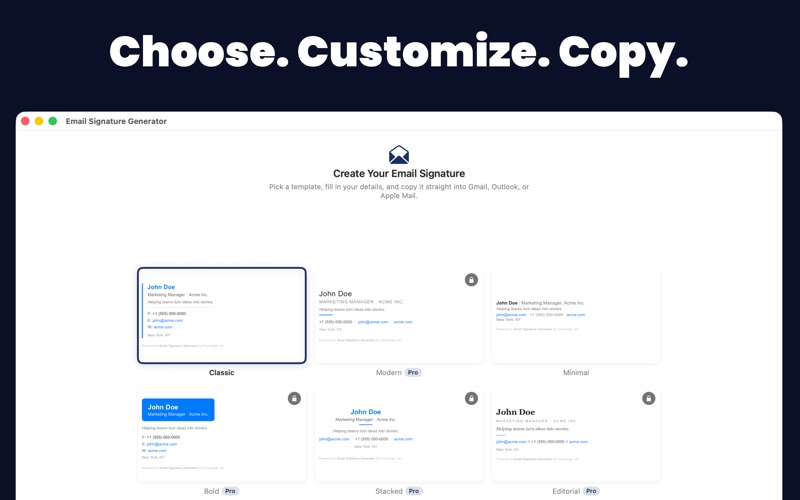
Every work email you send is a first impression. Email Signature Generator gives you a signature that tells people who you are, what you do, and how to reach you — so you look credible and get replies. No design skills, no code, no subscription.

HOW IT WORKS
1. Fill in your details.
2. Pick a style. Previews show your own name and colours, not someone else's.
3. Copy, then paste into Gmail, Outlook, or Apple Mail. Done.

WHAT GOES IN IT
• 6 designs: Classic, Modern, Minimal, Bold, Stacked, and Editorial.
• Your brand colour and a choice of 7 email-safe fonts.
• Name, pronouns, job title, company, tagline, email, phone, mobile, website, and location.
• Logo and headshot.
• Social links — 20+ platforms including LinkedIn, Instagram, GitHub, WhatsApp, and YouTube.
• Fine print for a confidentiality notice or the company registration details some countries require.

Note: logos and photos need to be at a public web address. Email can't carry a picture from your Mac.

GETTING IT INSTALLED — THE PART THAT USUALLY GOES WRONG
• Buttons that open Gmail's settings, Outlook, or Apple Mail for you.
• Step-by-step guides that include the easy-to-miss setting — the one that decides whether your signature actually appears on the emails you send.
• A "Doesn't look right?" section covering five things that commonly surprise people.
• Export an .html file any time for a copy you can keep.

SEE IT THE WAY THEY WILL
• A live preview updates as you type, shown at the foot of an email.
• Switch between desktop and phone width, and light and dark.
• See it with images blocked — how many people meet you before they choose to load them.
• Click any link in the preview to check it works.
• Phone numbers are tap-to-call for anyone reading on a phone.

NEVER SEND THE OLD ONE BY MISTAKE
Changed your job title and forgot to re-paste? A line under the preview tells you your email app is still sending the old version, with a Copy Again button right there. While a signature is unfinished, it tells you what's still worth adding.

QUIET CHECKS ALONG THE WAY
The app catches small things before your recipients do: a typo in your email, web or social address; a photo that will look stretched in Gmail and Outlook; an image address that won't load; a social row you haven't filled in yet; and a brand colour too pale or too dark to read as text — that one is adjusted for your name and links automatically, while your accent lines keep the exact colour you picked.

ONE SIGNATURE ISN'T ALWAYS ENOUGH
Work, personal, side business — make as many as you need, duplicate one to create a variant in seconds, and switch between them anytime. Everything syncs across your Macs with iCloud.

BUILT FOR THE KEYBOARD
Templates with Command-1 to Command-6, copy with Command-C, new with Command-N, duplicate with Command-D, rename with Command-R, export with Shift-Command-E. VoiceOver labels throughout, with spoken announcements for copying, AI results and field checks. Copying also puts a clean plain-text version on your clipboard, so pasting into Slack or Notes gives readable text rather than code.

UPGRADE TO PRO — ONE-TIME PURCHASE, NO SUBSCRIPTION
• Unlock 4 more designs: Modern, Bold, Stacked, and Editorial.
• AI Studio: clean up your job title, suggest a tagline, or rewrite your tagline to be plainer, sharper, or more formal. It won't invent a job title you haven't given it, or make you sound more senior than you are.
• Runs entirely on your Mac with Apple Intelligence — nothing is sent anywhere. (AI Studio needs Apple Intelligence and macOS 26. Everything else works on macOS 14 and later.)

Classic and Minimal are free, forever. No account, no sign-up, no ads, no tracking.

Every signature ends with a small "Powered by Email Signature Generator" line. It's how people find us, and it stays on the free and Pro versions alike — you're welcome to delete it from your own signature after you copy it.

Stop sending bare emails. Start making every message count.