



Description
Tesserac transforms app switching into a fast, spatial experience for macOS
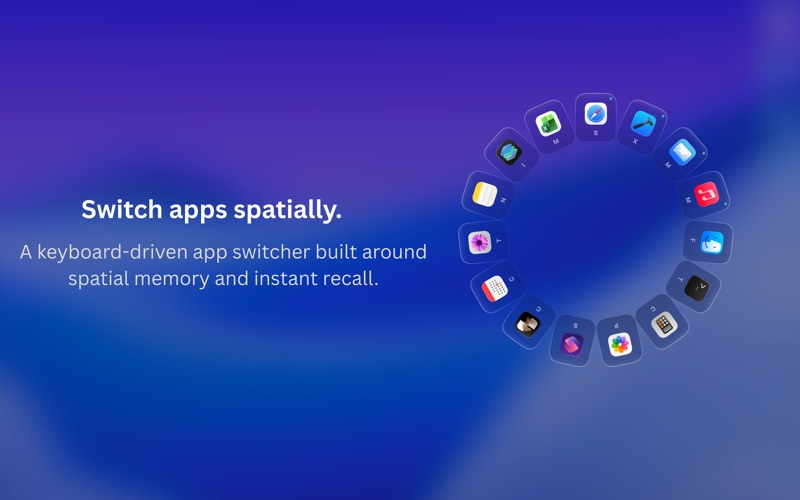
Tesserac transforms app switching into a fast, spatial experience for macOS. Instead of a flat Cmd+Tab strip, your running apps appear in immersive layouts designed for quick recall, fluid navigation, and keyboard-driven workflows.

SPATIAL APP SWITCHING
Hold a key to summon your apps instantly around the screen center. Glance, hover, release — switching becomes visual, spatial, and effortless.

MULTIPLE LAYOUTS
Choose the layout that fits your workflow:
Spatial Tile — immersive portrait tiles arranged in a ring.
Glass Orb — lightweight circular app orbs.
Grid — visual overview of all running apps.
List — compact keyboard-first navigation.

Fine-tune layouts, animations, speeds, and invoke behaviour with live previews.

BUILT AROUND MUSCLE MEMORY
Invoke Tesserac your way:

* Hold modifier keys (Control, Option, or Command)
* Custom keyboard shortcuts
* Middle mouse button
* Tab dwell launch from the native macOS app switcher

FAST RECALL & FUZZY SEARCH
Type a few letters to instantly filter and jump to the app you need. Designed for people who constantly switch between apps throughout the day.

TAILORED TO YOUR WORKFLOW
Pin favourite apps so they always appear in the switcher, even when not running. Hide distractions permanently using Ignored Apps. Fine-tune layouts, animations, and invoke behaviour with live previews.

DESIGNED FOR MACOS
Built using Swift, SwiftUI, and AppKit with smooth animations, native interactions, and full Apple Silicon optimisation. Runs quietly from the menu bar with no Dock icon or clutter.

PRIVACY FIRST
No analytics. No tracking. No data ever leaves your Mac.

7-DAY FREE TRIAL
Try every feature free. One-time purchase for lifetime access - no subscription, no recurring fees.
