Render Room is a native Mac workspace for multi-clip video editing and precise media conversion
Render Room is a native Mac workspace for multi-clip video editing and precise media conversion. Build compositions on a timeline, handle quick one-file exports, and inspect quality before committing to a full render—all without the clutter of a traditional editing suite.

Choose the workflow that fits the job.

EDIT

Arrange multiple video clips on a timeline. Trim, crop, split, reorder, and remove sections; add background audio; use undo and redo; then export the finished composition.

CONVERT

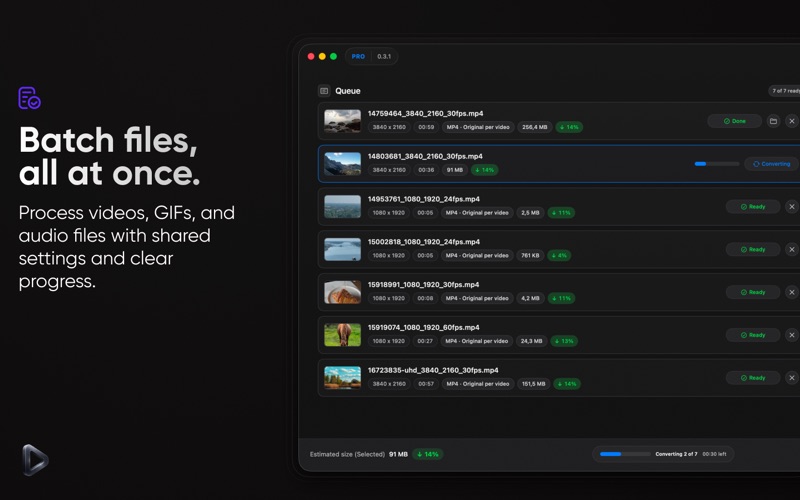
Drop in video, GIF, or audio files and export with control over format, dimensions, frame rate, quality, audio, metadata, color, and hardware settings. Queue multiple files and follow progress from one place.

PREVIEW BEFORE EXPORT

Generate a short encoded sample, compare the original and encoded result side by side, and see the estimated output size update as settings change.

AI AND COLOR TOOLS

Use on-device AI Upscale to enhance supported video and GIF exports up to 4×. Apply LUTs, color wheels, curves, and visual adjustments, with HDR-aware controls for supported footage.

HIGHLIGHTS

• Multi-clip timeline editing
• Video, GIF, and audio conversion
• Side-by-side quality comparison
• Real-time output size estimates
• On-device AI Upscale up to 4×
• Batch conversion with progress and retry
• MP4, MOV, GIF, WebM, MKV, and ProRes workflows
• MP3, WAV, and FLAC audio export
• Custom presets and filename templates
• Metadata, color profile, bitrate, and hardware controls

Built for modern Macs with Apple’s native media technologies, Render Room keeps the interface focused and processing local whenever possible.

Render Room Pro unlocks Edit mode, batch conversion, AI Upscale, advanced formats, LUT and HDR tools, visual adjustments, custom presets, encoded sample preview, side-by-side comparison, and deeper export controls.