风格

截图
4 张截图 网格- 版本
- 1.0.4
- 大小
- 2 MB
- 首次发布
- 2026年9月14日
- 分类
- 软件开发工具
应用介绍
来自 App Store 商店页Create clean screenshots and preview videos from real app windows.
App Capture removes the tedious work from preparing App Store media. There is no need to clean your desktop, draw a precise recording rectangle, manually centre an app window, or convert Retina recordings afterward.
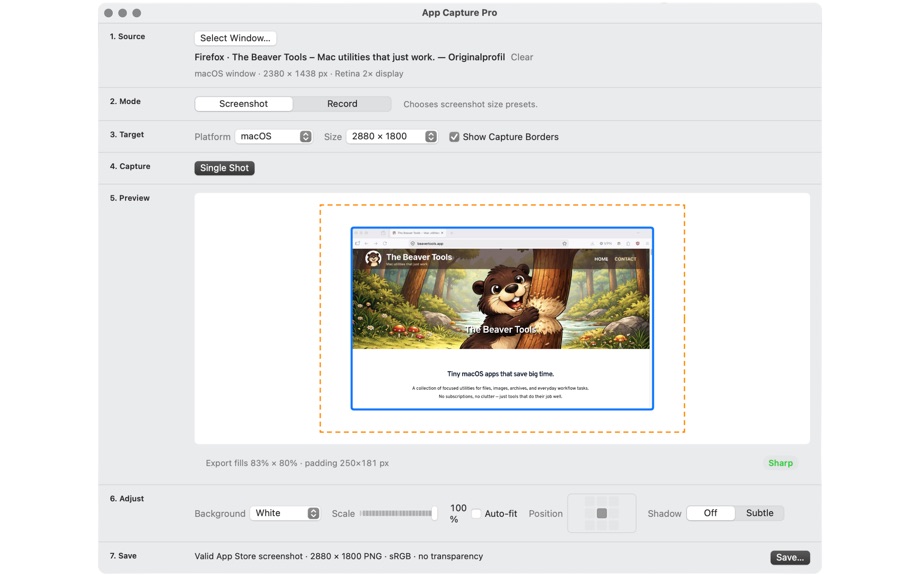
Select a Mac app or Simulator window, see how it fits inside the target frame, then take a screenshot or start recording.
Screenshots
• Select a Mac app or Simulator window
• See the captured window dimensions
• Preview the window inside the target output frame
• Capture without the surrounding desktop
• Remove the original window shadow
• Choose a macOS, iPhone, or iPad preset
• Adjust window scale and position
• Select a clean background colour
• Save a flattened PNG at the required size
Preview videos
• Record the selected app or Simulator window
• See the recording time while capturing
• Play, pause, and scrub through the recording
• Use the thumbnail strip to find the right position
• Trim the beginning and end
• Check the final duration before export
• Export a resized H.264 MP4
App Capture is designed for real product images—not mockups, device frames, marketing templates, or decorative graphics. Show users the actual app they will receive.
Everything is processed locally on your Mac. No upload, no account, and no analytics.
用户评价
0 条文字评价暂无文字评价
分享卡片 #
Instagram / 微博 / 小红书 会拉起系统分享并附带生成的卡片图
App Capture Pro
软件开发工具
¥48.00
iOSAppGallerywww.iOSAppGallery.com


App Capture Pro
软件开发工具
¥48.00
扫码查看详情
iOSAppGallery · iOSAppGallery.com
发现好玩的 iOS 应用与游戏
App Capture Pro
软件开发工具
¥48.00
扫码查看详情
iOSAppGallery · iOSAppGallery.com
发现好玩的 iOS 应用与游戏
App Capture Pro
软件开发工具
¥48.00
iOSAppGallerywww.iOSAppGallery.com


{"@context":"https://schema.org","@graph":[{"@type":"SoftwareApplication","name":"App Capture Pro","applicationCategory":"\u8F6F\u4EF6\u5F00\u53D1\u5DE5\u5177","operatingSystem":"iOS","url":"http://iosappgallery.com/zh-CN/share/6791573800","image":"https://is1-ssl.mzstatic.com/image/thumb/Purple211/v4/ff/83/3a/ff833ad7-a590-10c3-d88e-bcbca9af8abb/AppIcon-85-220-5-0-0-2x-0-0.png/512x512bb.png","aggregateRating":null,"offers":{"@type":"Offer","price":48.000,"priceCurrency":"CNY"}},{"@type":"BreadcrumbList","itemListElement":[{"@type":"ListItem","position":1,"name":"Apps","item":"/"},{"@type":"ListItem","position":2,"name":"\u8F6F\u4EF6\u5F00\u53D1\u5DE5\u5177"},{"@type":"ListItem","position":3,"name":"App Capture Pro"}]}]}