Important: the BMO® Mobile Banking app and services are offered by Bank of Montreal in Canada Only
Important: the BMO® Mobile Banking app and services are offered by Bank of Montreal in Canada Only.

Before using BMO Mobile Banking, existing customers must be registered for BMO Online Banking Services, and have set up enhanced sign-in security.

When using mobile banking please take reasonable steps to protect your private information:
• You must keep your personal identification number, password, challenge questions and responses, biometric information or other identification code (whether provided to you by us or selected by you) (each a “Secret ID Code”) and BMO MasterCard card or BMO Debit Card number (each a “Card”) confidential. They must only be used in connection with services you are certain come from Bank of Montreal in Canada (or our subsidiaries or authorized service providers)
• We encourage you not to keep any record of a Secret ID Code in close proximity to, or with, any Card at all times
• When selecting your own Secret ID Code, avoid use of number combinations that can easily be guessed by someone else, such as your birth date, address, telephone number or other such information that is easy for other parties to obtain
• For eligible iPhone* users: If any fingerprint(s) in addition to your own are stored on your device, you should not set up Touch ID*. Any fingerprints stored on your device will be able to access your BMO Mobile Banking. You are not able to assign or restrict which fingerprint(s) can access BMO Mobile Banking
• You are responsible for all fees charged by your mobile device service provider including standard messaging and data charges when you use mobile banking

More information about our Electronic Banking Services Agreement and how to keep your information protected is available at www.bmo.com/security
www.bmo.com/privacy

With the BMO Mobile Banking app, completing everyday transactions is quick and easy, as well as safe and secure, so you can confidently bank on the go.

We work hard to protect your confidential information and privacy. Rest assured that you are protected by our 100% Electronic Banking Guarantee. We will reimburse you 100% for any losses to your personal bank accounts resulting from unauthorized transactions through BMO Mobile Banking. For more information please visit: www.bmo.com/security

FEATURES:
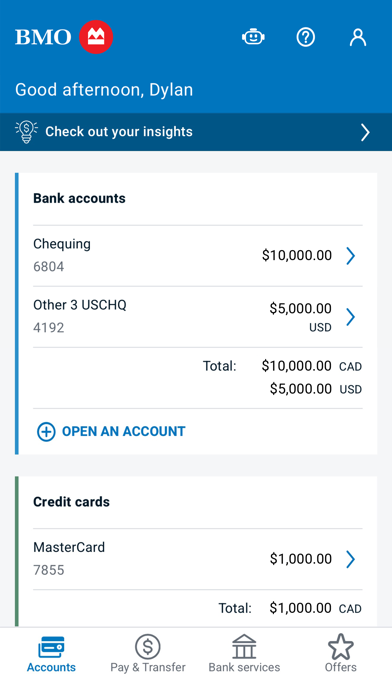
• View your account balances directly from your Account Summary. View transaction history on any of your accounts
• Transfer funds including cross currency and send an INTERAC e-Transfer
• Pay bills, manage Payees, set up future-dated bill payments and view payment history
• View detailed account info, including credit card balances, due dates, minimum payments, mortgage details
• Book an appointment
• Save your most used BMO Debit Cards or credit cards to sign in quickly and securely
• Find BMO branches and ATMs
• Sign in using Touch ID for quick access

GET STARTED:
To use BMO Mobile Banking, you must be registered for BMO Online Banking. Simply sign in to BMO Mobile Banking exactly as you would sign in to BMO Online Banking. If you are not registered for BMO Online Banking, visit www.bmo.com/onlinebanking  to register today.

Learn more at:
www.bmo.com/mobile

PRIVACY DISCLOSURES
You acknowledge and understand that this app incl. updates or upgrades may (i) cause your device to automatically communicate with BMO’s servers to deliver the functionality described above and to record usage metrics, (ii) affect app-related preferences or data stored on your device, and (iii) collect, use and disclose personal information as set out in our BMO Digital privacy policy. You can withdraw your consent at any time by uninstalling the app.  For help please contact us at:

BMO Bank of Montreal - [email protected]

*iPhone is a trademark of Apple Inc., registered in the U.S. and other countries. Touch ID is a trademark of Apple Inc.