THE RIGHT FOCUS MODE FOR EVERY SITUATION
Focus modes let your iPhone adapt to different parts of your life
THE RIGHT FOCUS MODE FOR EVERY SITUATION

Focus modes let your iPhone adapt to different parts of your life.

You may use Work to silence personal distractions, Personal to hide professional notifications, Holiday to disconnect from work, or Sleep to reduce interruptions at night.

But the automation options built into iOS may not be flexible enough for every schedule.

Smart Focus adds the missing logic.

AUTOMATICALLY CHOOSE THE RIGHT FOCUS MODE

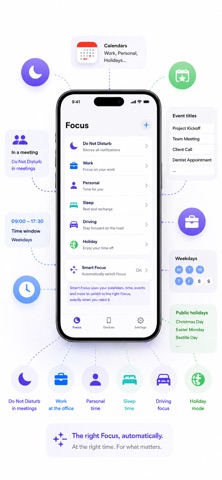
Smart Focus determines which Focus mode should be activated based on your configuration, including:

- working and non-working days;
- working hours;
- wake-up and bedtime schedules;
- ongoing calendar events;
- accepted or tentative meetings;
- all-day events;
- keywords found in event titles;
- public holidays from a dedicated calendar;
- custom exclusion keywords.

FLEXIBLE AND FULLY CONFIGURABLE

Choose which Focus modes you want to use and enter their exact names as configured on your iPhone.

You can configure modes such as:

- Do Not Disturb;
- Work;
- Personal;
- Holiday;
- Sleep;
- or no active Focus mode.

You can also define different schedules for working days and non-working days.

WORKS WITH APPLE SHORTCUTS

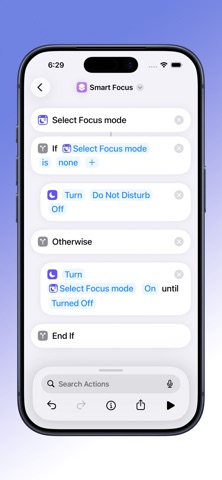
For privacy and security reasons, third-party apps cannot directly change the active Focus mode.

Smart Focus determines the appropriate mode, then Apple Shortcuts applies it automatically.

A ready-to-use shortcut template is available from the support page, or you can create your own automation.

PRIVACY-FOCUSED

Your configuration and calendar information are processed on your device.

Smart Focus does not require an account and does not upload your calendar content to an external server.

TRY IT FREE

Smart Focus can be used free for 30 days.

After the trial period, you can choose:

- a monthly subscription;
- a yearly subscription;
- or a one-time lifetime purchase.

An additional trial period may be available when starting a subscription.

The standard Apple Terms of Use (EULA) apply:
https://www.apple.com/legal/internet-services/itunes/dev/stdeula/

Privacy Policy:
https://stilltrue.hsd.me/privacy