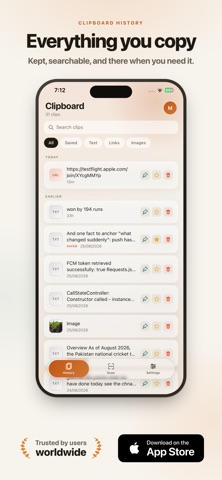
Everything you copy, kept — and one tap away in any app.

Clipboard remembers what you copy so you can paste it back later, from a keyboard
that works anywhere on your iPhone. No more copying something twice because you
lost the first one.

THE KEYBOARD IS THE POINT

Switch to the Clipboard keyboard in any app, and your history is right there. Tap a
clip to insert it. No app switching, no losing your place in what you were writing.

SYNC WITH YOUR MAC

Sign in, and what you copy on your Mac appears on your iPhone within seconds, and
the other way round. Copy a link at your desk, paste it into a message on the bus.

WHAT YOU GET

• Your recent clips, searchable
• Pin the ones you use constantly so they never age out
• Favourites for the text you retype all day
• Images and links, not just plain text
• A built-in QR and barcode scanner — whatever the code holds is saved as a clip
• Light and dark, with a keyboard that matches

HONEST ABOUT TWO THINGS

The keyboard needs Full Access, because iOS will not let a keyboard read the
clipboard or your saved history without it. No keystrokes are recorded and nothing
is logged — the keyboard reads the clipboard only while it is on screen.

And iOS does not allow any keyboard to insert an image directly. Tapping an image
clip copies it, and you paste it with a long press. That is a limit of iOS rather
than of this app, and we would rather say so here than have you discover it later.

GETTING STARTED

Settings › General › Keyboard › Keyboards › Add New Keyboard › Clipboard, then turn
on Allow Full Access. The app walks you through it.