Help keep threats and abuse out of co-parenting conversations.

ClearPath checks messages before delivery, giving you a dedicated channel to discuss your children. Messages flagged for changes stay in a private draft, where the sender can edit and try again. AI can miss abuse or flag something incorrectly, so screening is an added layer of support, not a guarantee of safety.

MESSAGE SCREENING COMES FIRST
AI screening checks for threatening, abusive and coercive language before a message reaches the conversation. Clear results help the sender understand when to revise a draft or retry a check. A suggested rewrite is yours to review and edit; it is never sent automatically. Brooke AI also offers ideas for communication and everyday co-parenting challenges.

PREPARE FOR HANDOVERS
Build a reusable checklist for school bags, activity kits and the essentials your family needs. Add and edit items, tick what’s ready and reset the list for the next handover. Your checklist is private to your ClearPath account. Turn on Apple Watch sharing in Settings to keep a copy on your paired Watch, with updates confirmed on iPhone while connected. A recent read-only copy is available for up to one hour when disconnected. Your checklist is not shared with your co-parent.

FIND A CLEAR STARTING POINT
Use six message templates for pickups, schedule changes, school updates, shared costs, belongings and acknowledgements. Add details, edit your draft, choose an accepted contact and review it in the conversation. Nothing sends automatically. Checklists and templates are free to use after account setup.

MESSAGE FROM APPLE WATCH
Read recent screened messages and review a short reply on your paired Watch. Enable messages in iPhone Settings > Apple Watch. A reachable, signed-in iPhone is required. Every send uses the same screening and Access checks.

PLAN PARENTING TIME
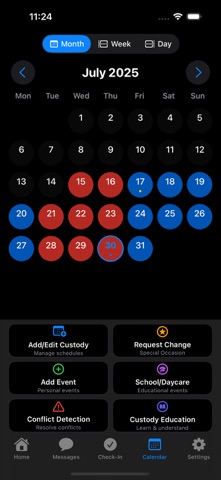
Create custody arrangements, organise handovers and view your shared calendar by day, week or month. Keep parenting time, school events, activities and appointments easier to follow.

ORGANISE SHARED EXPENSES AND RECORDS
Record parenting costs, choose a proposed split and attach receipts. Keep children’s information and parenting documents together, save device-reported location check-ins with available capture details and export selected records to PDF.

START WITH THE BASICS
Choose a practical starting point and complete a shorter setup. Add children in Kids Info and invite your co-parent from Connections when ready. Shared conversations require an accepted co-parent connection. Optional handover and weekly planning reminders can help you prepare; you choose whether to enable them.

CLEARPATH ACCESS
Explore monthly and annual auto-renewing subscriptions for paid features, including custody schedules, co-parent conversations, shared expenses, documents and Brooke AI. The app shows your remaining free uses, included features and local price before you purchase. A seven-day introductory trial is available only when Apple confirms eligibility.

Payment is charged to your Apple Account when you confirm a purchase, or when an eligible free trial ends. Subscriptions renew automatically unless cancelled at least 24 hours before the current period ends. Manage or cancel through your Apple Account settings. Any unused portion of a free trial is forfeited when you purchase a subscription, where applicable. A ClearPath connection and Apple Family Sharing are separate; connecting your co-parent does not itself grant paid access.

AI suggestions and screening can make mistakes. Templates and AI support are writing aids, not legal, medical, therapeutic or emergency advice. Check the details and use your own judgement.

Bring more clarity to your next parenting day with ClearPath.

Terms of Use: https://www.apple.com/legal/internet-services/itunes/dev/stdeula/
Privacy Policy: https://clearpath.family/privacy