ScreenShift - Instant Display Control
Managing multiple monitors on macOS shouldn’t feel like solving a puzzle
ScreenShift - Instant Display Control
Managing multiple monitors on macOS shouldn’t feel like solving a puzzle.
ScreenShift lets you reposition and organize your displays instantly - faster, simpler, and without diving into System Settings.
Whether you work with one external monitor or a complex multi-display setup, ScreenShift gives you full control in seconds.

Drag, Drop, Done
Open ScreenShift from the menu bar to see all connected displays in a clean visual layout.
Drag displays freely in space - left, right, above, below, or anywhere you want - and apply the configuration instantly.

One-Click Directional Positioning
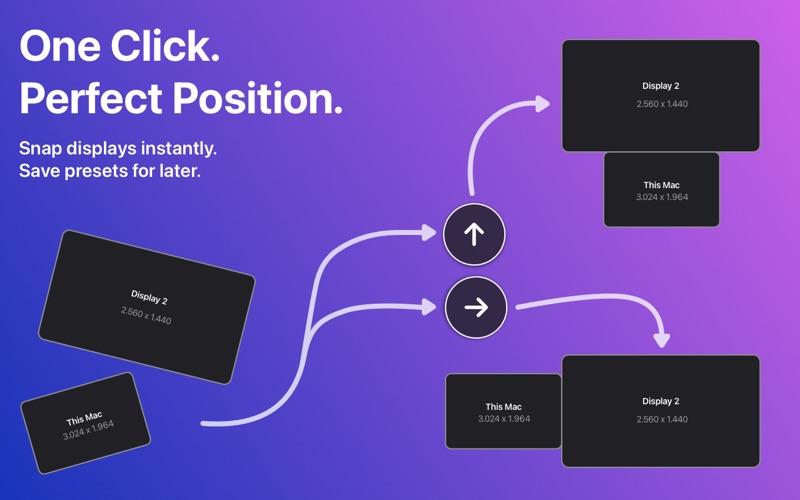
Prefer speed over precision? Snap displays into place in one click.
Use the directional arrows to move any display to the right, left, above or below the main display.
Perfect for quick adjustments without dragging.

Save & Recall Presets
Switch between setups instantly - work, home, presentation, or travel.
Save up to four display presets and apply them instantly with a single click.

Global Keyboard Control (CMD + D)
ScreenShift shines when you keep your hands on the keyboard.
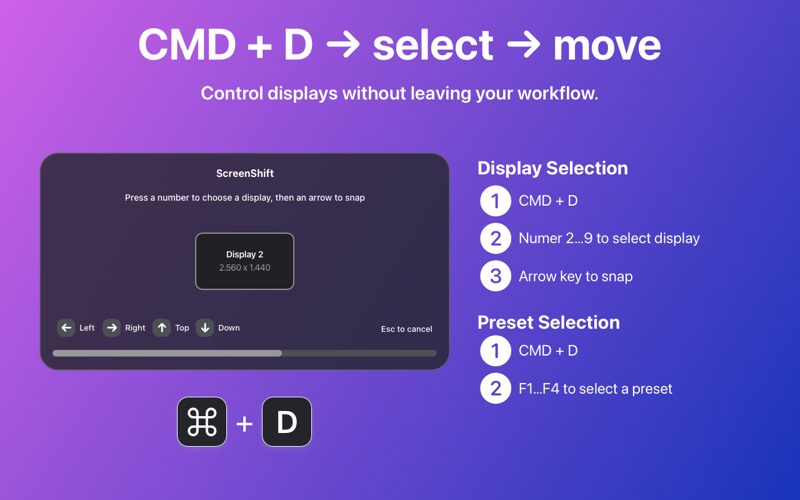
Press CMD + D anywhere on macOS to open a quick popover:
    • Select a display by number
    • Move it using arrow keys
    • Apply presets instantly with F1-F4

Designed for macOS Power Users
    • Menu bar app - always available, never in the way
    • Works system-wide with a global hotkey
    • Lightweight, fast, and focused
    • Ideal for developers, designers, traders, and multi-monitor professionals