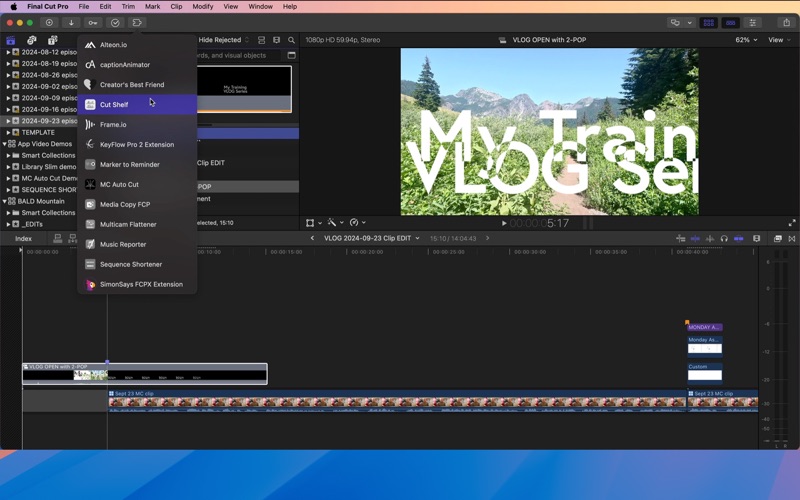
Cut Shelf is your global library for Final Cut Pro content, making reusable clips, effects, and templates instantly accessible across all your projects and devices
Cut Shelf is your global library for Final Cut Pro content, making reusable clips, effects, and templates instantly accessible across all your projects and devices.

As long as you have the same media files accessible on your systems, you can drag-in from Cut Shelf and relink if needed.

THE PROBLEM

Video editors constantly recreate common elements or dig through old projects to find clips they've used before: signature title animations, 2-pops, credit sequence templates. This content gets buried in project libraries, making it impossible to build a reusable library that works across projects and devices.

THE SOLUTION

Cut Shelf provides a global library for your FCPXML content. Save clips once, use them in any project, on any Mac. Everything syncs automatically via iCloud Drive, and custom folders enable team collaboration through shared storage.

KEY FEATURES

• Global Library for Reusable Clips
Build your personal library of content you use across multiple libraries. Save compound clips, projects—anything FCPXML—and access it instantly from any library.

• Works Inside Final Cut Pro
Appears as a Workflow Extension (Window → Extensions). Your library is always accessible while editing. No app switching, no exporting, no file hunting.

• Drag & Drop Workflow
Save content by dragging from Final Cut Pro into a shelf. Retrieve it by dragging from a shelf back into your timeline. Fast, intuitive, and natural.

• iCloud Sync to All Your Systems
Edit on your Mac Studio in the suite, then pick up on your MacBook Pro in the field. All shelves sync automatically via iCloud Drive with real-time UI updates.

• Custom Folders for Shared Storage and Team Collaboration
Store shelves in custom iCloud Drive folders or shared network locations. Share .cutshelf package files with team members so everyone has access to approved templates and effects.

• Share .cutshelf Packages
Each shelf is a portable .cutshelf package file. Double-click to open in Cut Shelf, or share via Dropbox, email, or network drives for team distribution.

• Multiple Shelf Organization with Reordering
Create shelves for different categories or jobs. Drag to reorder shelves in your preferred sequence.

• Smart Naming from FCPXML Content
Items are automatically named by extracting the project name from FCPXML metadata. Rename anything, anytime.

WORKFLOW

Create shelves to organize content by category, project type, or client
Drag FCPXML content from Final Cut Pro into shelves while you edit
Reorder shelves to match your workflow priorities
Drag items back into any project—same Mac or different Mac, synced via iCloud
Share .cutshelf package files with your team for collaborative access
Manage storage settings in the standalone app (local vs. iCloud Drive)

FOR TEAMS

Share your library across editorial teams using custom folders on shared network storage. Distribute approved title templates, brand color grades, and motion graphics packages via .cutshelf files. When supervisors create new templates, they sync automatically to all team members.

STANDALONE APP

In addition to the extension, Cut Shelf includes a full standalone app for managing storage settings, browsing all shelves, performing bulk operations, and switching between local storage (App Groups) and iCloud Drive with automatic data migration.

REQUIREMENTS

• macOS 13.0 or later
• Final Cut Pro 10.6.5+
• iCloud Drive (optional, for sync)

From Automatic Duck—helping editors work smarter since 2001.