



Description
Your photo library grew while you weren't looking
Your photo library grew while you weren't looking. Thousands of screenshots, duplicates, and forgotten moments piling up with no easy way to sort through them. Keeper changes that.

Keeper helps you declutter your photo library through a simple daily ritual. Each day, it surfaces photos from today's date across all your past years — so you can relive old memories while deciding what to keep and what to let go.

HOW IT WORKS

Open Keeper, see your photos from this day in history, and swipe through them. Keep the ones that matter. Delete the ones that don't. That's it.

  - Browse photos grouped by year for any date
  - Navigate between dates with swipe gestures or a calendar picker
  - Delete photos with a tap — they go to Apple's Recently Deleted, so you have 30 days to change your mind
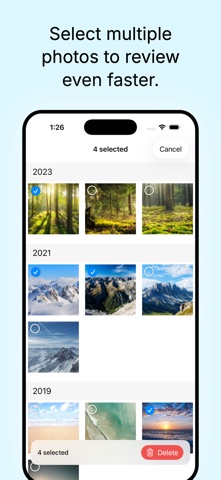
  - Long press to select multiple photos and delete in bulk
  - Add favorites to albums or share them with friends

YOUR LIBRARY, YOUR PACE

Keeper is designed for a few minutes a day, not an overwhelming marathon. Set a daily reminder, review a handful of photos, and watch your library get tidier over time.

  - Track how many days you've reviewed on a visual calendar
  - See your total photos deleted and library progress
  - Pick up right where you left off, every day

WORKS WITH APPLE PHOTOS

Keeper doesn't duplicate or store your photos. Everything stays in your Apple Photos library. Deletions use Apple's built-in Recently Deleted album with a 30-day safety net.
