Capture, explain and share what is happening on your iPhone or iPad.

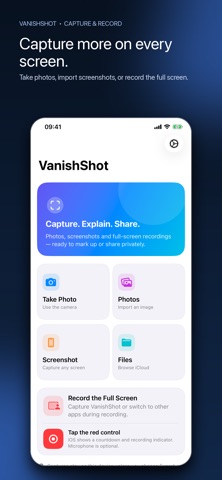
VanishShot combines camera capture, screenshot markup and full-screen recording in one privacy-first workspace. Take a photo, import from Photos or Files, or start an Apple-confirmed screen recording and switch between supported apps. Nothing is uploaded unless you explicitly create a Private Link.

CAPTURE WHAT MATTERS
• Take a photo with the camera and open it directly in the editor
• Import screenshots and images from Apple’s private photo picker
• Browse images in Files and iCloud Drive
• Follow the built-in guide to take an iPhone or iPad screenshot
• Record the full display with Apple’s system broadcast control
• Include microphone audio when you enable it in the system recording sheet

ANNOTATE WITH PRECISION
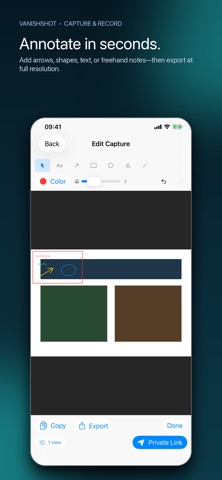
• Add arrows, rectangles, circles, lines, text and freehand notes
• Choose colors and line widths
• Select, move and remove annotations
• Undo and redo up to 50 changes

PREVIEW, EXPORT OR SHARE
• Preview screen recordings inside VanishShot
• Export images and MP4 recordings through the native share sheet
• Create a private expiring link only when you choose
• Expire links after one or five views, or after a timer

PRIVACY BY DEFAULT
Photos, screenshots and recordings stay on your device until you choose Export or Private Link. Camera access is requested only after Take Photo. Full-screen recording starts only through Apple’s visible countdown and recording indicator. There is no account, subscription, advertising, analytics or tracking.

Some apps and protected video may restrict screen capture. VanishShot respects those system protections.