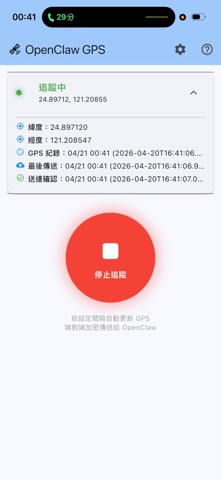
claw GPS Tracker is a privacy-first location tracking companion for OpenClaw, the open-source AI assistant
claw GPS Tracker is a privacy-first location tracking companion for OpenClaw, the open-source AI assistant.

Your phone sends encrypted GPS coordinates to your own computer through a zero-storage relay server. OpenClaw can then query your location and movement history — all without any third party ever seeing where you are.

HOW IT WORKS
• Your phone acquires GPS coordinates at a configurable interval
• Coordinates are end-to-end encrypted using X25519 key exchange and AES-256-GCM
• Encrypted data is forwarded through a relay server that stores nothing
• Only your computer (running gps-bridge) can decrypt and store the data
• OpenClaw queries your location locally — no cloud, no external API

FEATURES
• End-to-end encryption with forward secrecy (new key per message)
• Background GPS tracking with configurable update intervals
• History recording with adjustable granularity and retention period
• Multiple sharing modes: Auto, Ask (coming soon), and Deny
• Official relay server included — no setup required
• Self-hosting supported for full control
• Open source: phone app, relay server, and bridge are all publicly auditable

PRIVACY BY DESIGN
• The relay server is zero-storage — it only forwards encrypted blobs
• Your private key never leaves your computer
• GPS data is stored only on your own machine
• No account required, no telemetry, no ads
• You control exactly when and how often your location is shared

SETUP
1. Install gps-bridge on your computer (pip install gps-bridge)
2. Tell OpenClaw: "I want to set up GPS tracking"
3. OpenClaw generates a pairing token and public key
4. Enter them in this app's Settings page
5. Tap Start Tracking — done!

REQUIREMENTS
• A computer running gps-bridge (Linux, macOS, or Windows)
• OpenClaw with the gps-location skill installed

Learn more:
https://github.com/luna61ouo/gps-tracker-app
https://github.com/luna61ouo/gps-bridge