ClipScan turns your iPhone or iPad into a portable document scanner. Capture any document with your camera, fine-tune it with built-in editing tools, and share a clean PDF or JPG in seconds — no subscription required.

SCAN DOCUMENTS INSTANTLY
Point your camera at any receipt, contract, ID, whiteboard, or paper document. ClipScan uses Apple's advanced document detection to capture sharp, perfectly cropped images every time.

POWERFUL EDITING TOOLS
• Color Filters — choose between Color, Black & White, Photo, or Grayscale to get exactly the look you need.
• Contrast Adjustment — drag the slider to fine-tune brightness and contrast until every detail is clear.
• Rotation & Crop — rotate left or right, or reset to the original orientation with a single tap.
• Paper Size Selection — preview your document in Letter, A4, Legal, or A3 format and see exactly how the final export will look.

MULTI-PAGE DOCUMENTS
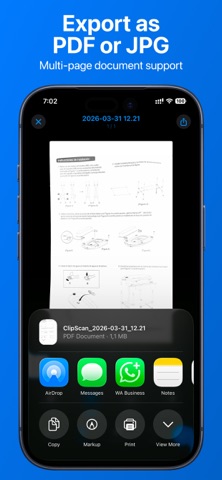
Add as many pages as you need to a single document. Reorder, delete, or add more pages at any time. Each page keeps its own filter, contrast, and size settings.

SHARE YOUR WAY
Export your documents as a compressed PDF or as individual JPG images. Share instantly via AirDrop, email, Messages, cloud storage, or any app that accepts files.

RENAME & ORGANIZE
Give each document a meaningful name. Rename from the document list or directly from the editor. Your library is sorted by date so recent scans are always at the top.

IMPORT FROM PHOTOS
Already have a photo of a document? Import images from your photo library and edit them with the same powerful tools.

WHY CLIPSCAN?
- One-time purchase — pay once, use forever
- No subscriptions, no ads, no hidden fees
- No account required — your documents stay on your device
- Works offline — no internet connection needed
- Supports iPhone and iPad
- English and Spanish localization

Privacy first: ClipScan only accesses your camera when you choose to scan. Your documents are stored locally on your device and are never uploaded to any server.