Stop copy-pasting screenshots into Translate.

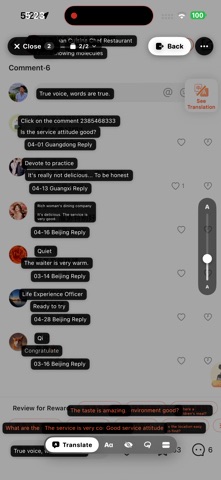
You know the loop — screenshot, switch to Translate, paste the image, wait, squint at the cropped result, switch back. Rosetta kills it. Snap a screenshot in any app and Rosetta lays the translation right where the original text was. No switching apps. No retyping.

TWO TAPS. OR ZERO WITH BACK TAP.
1. Take a screenshot — any app, any time.
2. Open Rosetta — your screenshot's already there, already translating.

Set up iOS Back Tap once and step 1 becomes a double-tap on the back of your phone. The whole flow takes a couple seconds.

AUTO-PICKUP
Just take screenshots — anywhere, in any app. When you open Rosetta, they're already queued and already translating. Take a few in a row and Rosetta stacks them into a deck — swipe through, every shot already done.

THREE WAYS TO READ
• Chips view — translations overlaid right where the original text was. Tap any chip for pronunciation, full sentence, or to copy.
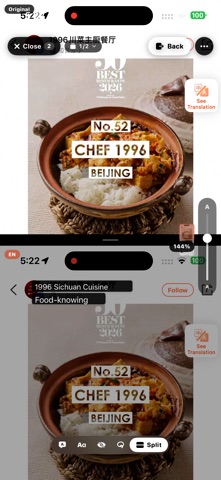
• Split-view — original on top, English below, scrolling together as you read.
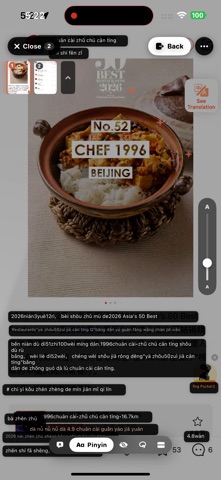
• Pinyin mode — for Chinese, romanization above each character so you can actually pronounce what you're reading.

TAP TO SELECT
Drag a box around just the phrase you want. Skip the noise on the rest of the screen.

30+ LANGUAGES
Chinese (Simplified & Traditional), English, Japanese, Korean, Spanish, French, German, Italian, Portuguese, Russian, Arabic, Hindi, Vietnamese, Thai, Indonesian, Turkish, Polish, Dutch, Ukrainian, and more. New languages roll out as Apple adds them.

PRIVATE BY DEFAULT
• No account, no sign-in, no email.
• Translation runs on your iPhone using Apple's framework. The default mode never sends a screenshot to any server.
• Optional: Rosetta can auto-delete screenshots from your camera roll after translating, so it doesn't clutter your photos.
• Optional Cloud mode: for tricky stuff (handwriting, dense text, mixed languages), swap in your own AI provider key in Settings. Cloud requests are not stored.

WHO IT'S FOR
• Travelers reading menus, signs, and apps in another language.
• Students translating homework or research.
• Anyone using WeChat, LINE, KakaoTalk, Xiaohongshu, or any chat app where copy-paste is awkward.
• Manga and webtoon readers.
• People learning a language who want to read in context.

WHY ROSETTA
Most translation apps make you copy text out, paste into a translator, then re-read. Rosetta keeps the layout — you stay in the moment, see the translation right where the original was, and move on.

No subscription. No ads. No account. Just a clean translator that does one thing very well.