The PingScore difference:
A fast internet connection doesn't necessarily mean a good internet connection
The PingScore difference:
A fast internet connection doesn't necessarily mean a good internet connection.
Bandwidth tells you how much data your connection can carry.

PingScore tells you how well that connection is performing.

By measuring Round Trip, Packet Loss and Jitter, PingScore gives you a clearer picture of the connection quality that affects gaming, streaming, video calls, browsing and other real-world activities.

For everyday users:
PingScore works out of the box. Just press Start to see how your internet connection is performing.

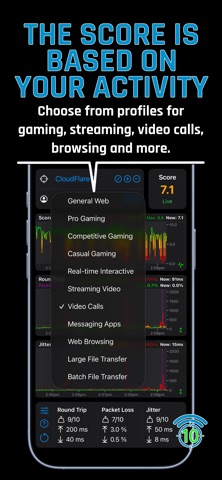
Choose a profile based on what you're doing — gaming, streaming, video calls, browsing and more. PingScore uses the performance requirements of that activity to calculate a simple 0–10 score.

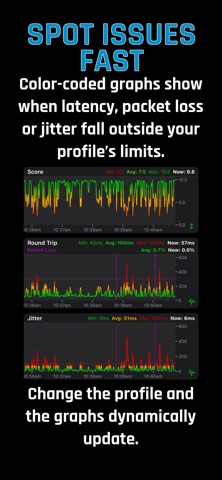
The result is easy to understand at a glance, with colour-coded scores and graphs showing when your connection is performing well and when there may be a problem.

You don't need to understand networking or analyse technical data. PingScore turns complex connection performance into a simple answer.

For advanced users:
PingScore also gives you full control over how your connection is evaluated.

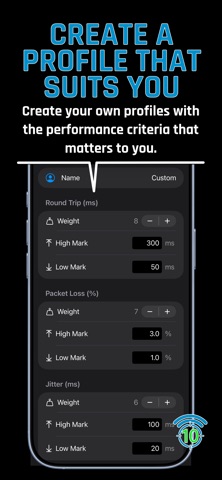
Create custom profiles with your own performance thresholds and weighting for Round Trip, Packet Loss and Jitter.

Create custom targets to monitor the servers and services that matter most to you.

Features:
• Activity-based scoring — Choose profiles for gaming, streaming, video calls, browsing and more, or create your own with custom performance thresholds and weighting.
• Simple 0–10 score — Turn complex connection measurements into an easy-to-understand score that reflects your selected activity.
• 5-minute performance graphs — View the last 5 minutes of Score, Round Trip, Packet Loss and Jitter, with colour coding that highlights performance outside your selected profile's acceptable range.
• Custom targets — Create targets to monitor the servers and services that matter most to you.
• Spot issues quickly — Colour-coded graphs highlight when performance falls outside the acceptable range for your selected profile.
• Background monitoring — Continue monitoring for up to 30 seconds while the app is in the background, giving you a snapshot of your connection performance without keeping the app open.
• Lightweight & efficient — PingScore sends a small ICMP Ping every second while using very little data.