InputConfig turns any input device, such as a game controller, into a full keyboard and mouse for your Mac
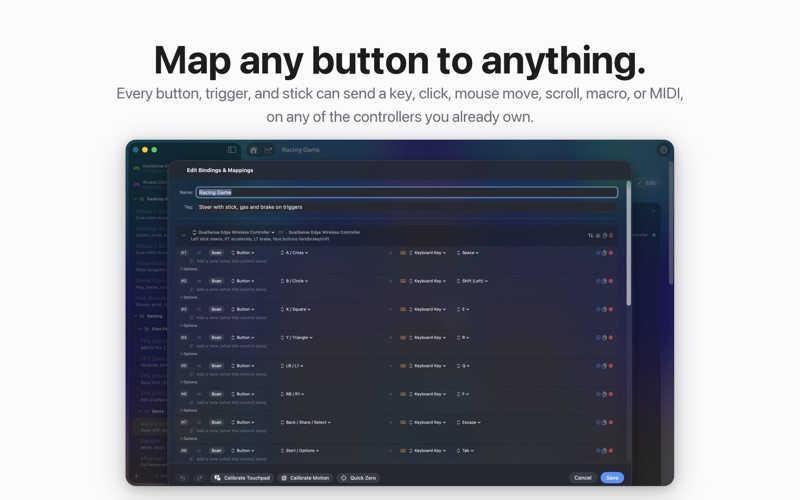
InputConfig turns any input device, such as a game controller, into a full keyboard and mouse for your Mac. Map every button, trigger, and stick, then control macOS and every app with the controller in your hands.

It is built for accessibility first. If a game controller is easier to hold and press than a keyboard and mouse, InputConfig makes it a complete, comfortable way to run your computer. The same mappings are just as useful for gaming, media, and creative work.

Every mapping works at the system level, so it runs in every app with nothing extra to install.

FEATURES
- Map any button, trigger, or stick to keyboard keys, mouse buttons, mouse movement, or scroll wheel
- Works with DualSense, DualSense Edge, DualShock 4, Xbox, Switch Pro, Joy-Cons, Stadia, 8BitDo, Steam Controller, etc., and any MFi or HID gamepad
- Variable sensitivity with Linear, Smooth, and Aggressive curves, set per binding
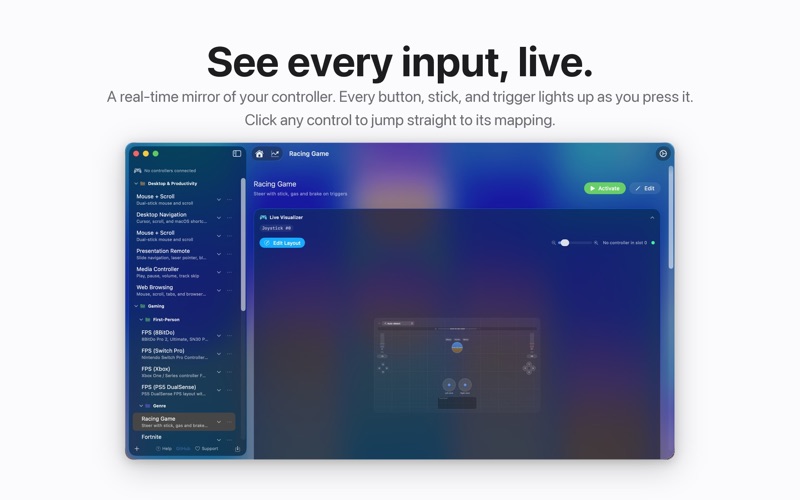
- Deadzone calibration with a live joystick visualizer
- Toggle mode: press once to latch on, press again to release (sticky modifiers, push-to-talk, auto-run)
- Macros with custom timing, plus Turbo rapid-fire at any rate
- Stacked outputs: one press can fire a key, a click, a MIDI note, and a spoken phrase at once
- Touchpad as a mouse on DualSense and DualShock 4, with independent multi-finger control
- Gyro aim: tilt the controller to move the mouse, free in every app
- Haptic feedback on press, with adjustable intensity
- Spoken feedback: say a custom phrase through your Mac or the controller speaker
- Light bar control: pick a color, set brightness, or run an RGB cycle on DualSense
- MIDI output: a virtual port for notes, CC, pitch bend, and transport to GarageBand, Logic, Ableton, and any DAW
- MIDI CC dials: turn sticks and triggers into continuous soft knobs
- Per-preset automation: launch an app, confine the cursor, auto-recenter it, and hide the pointer on activate
- Ready-made example presets for popular games and apps, plus your own custom presets
- A universal shortcut to toggle your most recent preset from anywhere
- Lifetime usage statistics with your most-used inputs and presets
- And many more features.

Private by design: everything stays on your Mac. No account, no telemetry, nothing sent over the network.

Terms of Use (EULA): https://www.apple.com/legal/internet-services/itunes/dev/stdeula/