




Description
**Markdown, as a document
**Markdown, as a document.**

Luma is a lightweight, quiet Markdown editor for macOS. Open plain files from your disk, write without a source/preview split, and keep everything local. Tables look like tables. Diagrams look like diagrams. You can focus on the document even if you do not think in Markdown syntax.

--------------------------------

■ Write Markdown without living in syntax

Headings look like headings, bold text looks bold, and tables appear as real tables as you type. Your files stay as ordinary `.md` files, so you can reopen them in any other Markdown tool whenever you want.

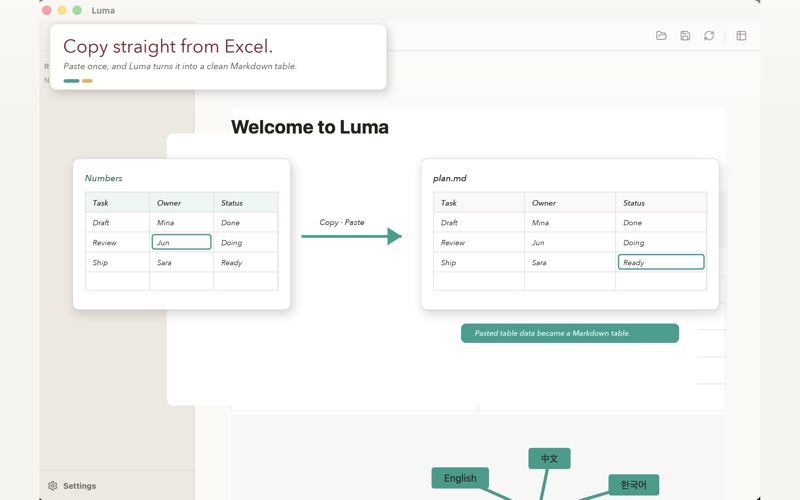
■ Paste tables straight from Excel

Copy a cell range from Excel, Numbers, or Google Sheets, then paste it into Luma. The clipboard content becomes a clean Markdown table automatically. No more drawing pipes and dashes by hand.

■ Turn Mermaid code into readable diagrams

Write a fenced `mermaid` code block and Luma renders it as a colorful diagram right away. Flowcharts, sequence diagrams, Gantt charts, pie charts, class diagrams, and state diagrams all work without opening another app.

■ Edit tables like tables

Use Tab and Shift+Tab to move between cells. Press Tab in the last cell and Luma adds a new row. When the cursor is inside a table, a small table toolbar appears so you can add or remove rows and columns quickly.

■ Make the page feel yours

Adjust the body font, text size, page width, and per-heading styles from one settings panel. Choose from the fonts already installed on your Mac, and tune the page until it feels right for the way you write.

■ Local, offline, and private

Luma does not connect to the internet. There is no account, no cloud sync, and no analytics. Your documents remain on your disk, and every feature works offline.

■ Built for macOS habits

Open `.md` and `.markdown` files directly from Finder. Use familiar shortcuts: Command-O to open, Command-S to save, and Command-Comma to open settings. Luma supports both light and dark appearance.

--------------------------------

■ Great for

· Blog posts, technical notes, and release notes
· Product and planning docs with tables or diagrams
· README files and operational docs you want to edit without an IDE
· AI-generated Markdown that needs a clean human pass
· Writers who want a small, focused tool instead of a full note system

■ Key features

· Live document-style Markdown editing
· GitHub Flavored Markdown support
· Headings, lists, quotes, code blocks, links, images, and tables
· YAML front matter preservation
· Mermaid diagram preview for flowcharts, sequence, Gantt, pie, class, and state diagrams
· Automatic Markdown table conversion from Excel, Numbers, and Google Sheets
· Table tools for adding and deleting rows or columns
· Tab and Shift+Tab cell navigation
· Automatic row creation at the end of a table
· Custom body font, text size, page width, and heading styles
· macOS system font picker
· `.md` and `.markdown` file association
· External file change detection and conflict handling
· Automatic light and dark mode
· 100% local: no network, no account, no analytics

■ What Luma is not trying to be

Luma does not include note graphs, backlinks, plugins, cloud sync, or collaborative editing. If you need a full knowledge base system, a larger notes app may be a better fit. Luma keeps that space empty so it can stay fast, calm, and focused on one plain document at a time.

■ System requirements

· macOS 12 Monterey or later
· Apple Silicon Mac support

■ Made by Waymaker Labs

Luma is made by Waymaker Labs, a small software studio in South Korea. For support and bug reports, visit https://waymakerlabs.kr/luma or use the help link inside the app.
CategoryLabel效率(96543)
VersionLabel1.0.3
BundleId: com.waymakerlabs.luma
DeveloperLabelWaymaker (KR)
LastUpdatedLabel2026-07-29
