Take control of your screen time with YourHour - a powerful Screen Time Tracker and App Blocker
Designed to help you understand your phone habits, reduce distractions, stay focused, and build healthi
Take control of your screen time with YourHour - a powerful Screen Time Tracker and App Blocker

Designed to help you understand your phone habits, reduce distractions, stay focused, and build healthier digital routines.

See where your time goes. Set meaningful limits. Break automatic scrolling habits. Make your phone work for you.

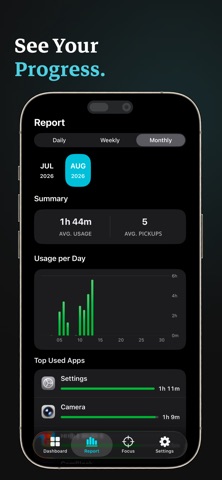
◆ SCREEN TIME DASHBOARD

Understand your daily phone use at a glance.

• Track total Screen Time

• See pickups and phone activity

• Discover your most-used apps

• View weekly Screen Time trends

• Explore detailed app usage

Turn raw usage data into something you can actually act on.

◆ APP BLOCKER & APP LIMITS

Set limits for the apps that take the most of your attention.

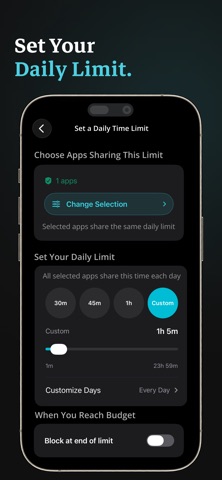
• Create daily limits for individual apps

• Choose when limits are active

• Block apps when your limit is reached

• Manage distracting social, entertainment and gaming apps

• Adjust or disable limits whenever you need to

Use app limits to protect time for work, study, family and things that matter most.

◆ FOCUS SESSIONS

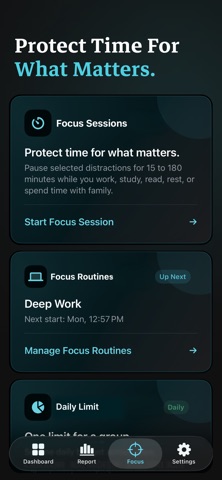
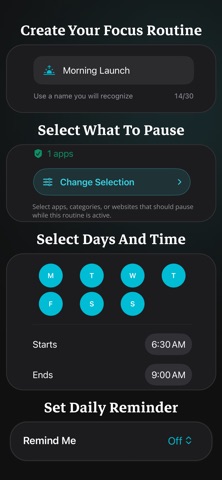
Protect focused time from distracting apps and websites.

Choose what to pause, set a focus duration, and stay on track while YourHour helps reduce interruptions.

With supported iPhone features, you can track Focus Sessions from the Lock Screen, Dynamic Island and Control Center.

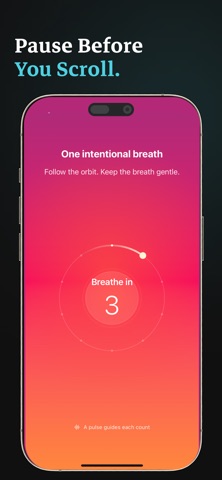
◆ MINDFUL PAUSE

Interrupt automatic phone checking before it becomes another scrolling session.

Mindful Pause guides you through a short breathing exercise before opening distracting apps, giving you a moment to decide whether you really want to continue.

◆ DOOMSCROLLING & DIGITAL DETOX

Trying to spend less time on social media?

YourHour helps you create boundaries around the apps and habits that consume your attention.

Use Screen Time insights, App Limits, Focus Sessions and Mindful Pause to reduce unnecessary

phone use and make your daily screen time more intentional.

◆ TIME BUDGETS

Group apps, categories and websites into shared time budgets.

Create a single daily allowance for a group of distractions and manage your time across them more intentionally.

◆ RECLAIM PLAN

Set a personalized 7-day Screen Time reduction goal.

YourHour tracks your progress and shows whether you're on track, at risk, or exceeding your target.

◆ DIGITAL HABIT SCORE

Go beyond a simple Screen Time number.

YourHour analyzes your recent phone usage and creates a personalized Digital Habit Score so you

can see how your digital habits are changing over time.

Track your progress and work toward healthier, more balanced phone use.

◆ CHALLENGES

Turn reducing Screen Time into a measurable goal.

Create structured challenges with custom durations, schedules, reminders and progress tracking.

Choose from different challenge types or create your own routine.

◆ CATEGORY INSIGHTS

See how much time you spend across categories such as:

• Social

• Entertainment

• Games

• Productivity

• Education

• Utilities

Identify the categories consuming your attention and decide where you want to make a change.

◆ BUILT FOR FOCUS & PRODUCTIVITY

YourHour can help you protect time for:

• Studying

• Work

• Reading

• Exercise

• Family time

• Personal goals

• Digital detox

Whether you're trying to reduce social media use, stop doomscrolling, improve focus, or simply understand your phone habits better, YourHour gives you practical tools to take control.

◆ PRIVACY BY DESIGN

YourHour is built using Apple's Screen Time framework.

• No account is required to get started

• You choose what to monitor

• Screen Time access is requested only when needed

• Your usage data stays on your device where supported

Your privacy matters, and YourHour is designed to help you manage your digital life without unnecessary complexity.

Start by understanding your current Screen Time.

Then set one limit, protect one focus session, & begin building a healthier digital routine

Terms of Use (EULA): https://www.apple.com/legal/internet-services/itunes/dev/stdeula/