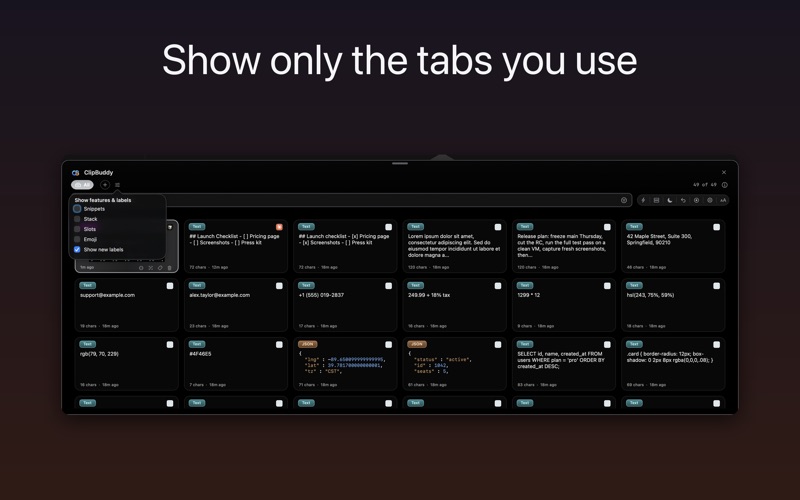
ClipBuddy is a native macOS clipboard manager — a searchable history of everything you copy, one keystroke away
ClipBuddy is a native macOS clipboard manager — a searchable history of everything you copy, one keystroke away.

Press ⌘⌥V to open your history. Type to filter, hit Enter — the clip is copied, ready to paste with ⌘V (or turn on direct paste and it lands in the app in front). Text, images, links, files, code and JSON — all searchable.

EVERYTHING STAYS ON YOUR MAC
ClipBuddy is local-first by design. No cloud, no tracking, no analytics, no account. Text recognition, translation and voice search all run on-device — nothing you copy ever leaves your Mac. Passwords and sensitive copies are skipped automatically, you can exclude any app from capture, and you can pause capture entirely — for 15 minutes, an hour, or until you resume.

FIND ANYTHING FAST
• Universal Search — one query surfaces matching clips, emoji and Labels together
• Search by meaning, not just keywords
• Find a screenshot by the words inside it — on-device text recognition, copy the text back out
• Voice search — tap the mic and speak; transcribed entirely on your Mac (optional)
• Filter by type, app, date, links, emails, phones, code, exact phrases; save searches as smart folders
• Frequent — a smart filter of the clips you re-copy most, plus a floating Quick Palette of pinned + frequent clips

TOUCH-ID VAULT
• Keep passwords, cards and secrets as encrypted clips
• Unlocked with Touch ID, protected by the Secure Enclave
• Everything stays on your Mac — never uploaded, never synced

RULES — AUTOMATE YOUR CLIPBOARD
• The moment you copy: skip it, strip tracking junk from links, pin, burn-after-paste, run a transform, or file it under labels
• Match on the app, the type, length, or the text — with search syntax: a | b, -exclude, "exact phrase"
• Starter Rules — one-click presets to set up common rules instantly

SNIPPETS WITH KEYWORD TRIGGERS
• Reusable text with keyword triggers, in groups
• Dynamic placeholders: date, time, clipboard, cursor position, fill-in fields, UUID

CLIPBOARD SLOTS & PASTE STACK
• Nine reusable slots for text you retype all day (⌘⌥1–9)
• Paste Stack: collect several copies and paste them back one at a time — ideal for forms

EMOJI PICKER
• Press ⌘⌥E for a searchable picker of 2,300+ emoji — by name, with flags and skin tones
• Generated on-device, nothing downloaded. Free for everyone.

QUICK ACTIONS & DEVELOPER TOOLS
• QR codes, open links, reveal in Finder, remove image backgrounds; on-device translate
• Transforms: case, trim, base64, URL-encode, JSON/XML/SQL format, JWT decode, HEX↔RGB, hashes, sort & dedupe, UUID, Unix-time ↔ date, URL parse
• Built-in dev panels: a regex tester, a CSV table viewer, and a two-clip diff
• Save transform chains as recipes; use ClipBuddy from the Services menu

COMMAND PALETTE & PREVIEWS
• ⌘K command palette — type to filter actions and jump anywhere
• Find any setting with a search box in Settings
• QuickLook thumbnails for PDFs and documents; syntax-highlighted code clips
• Screenshot auto-capture — new screenshots are saved and made searchable by the text inside them

NATIVE & LIGHTWEIGHT
Built in Swift/AppKit — a tiny menu-bar app, not Electron. VoiceOver-friendly, full keyboard access, ⌘/ shortcuts reference.

Pro unlocks unlimited history, meaning search, the Vault, slots, snippets, transforms and more — 7-day free trial, monthly/yearly, or one-time Lifetime. The emoji picker and your recent clips are free for everyone.

Requires macOS 13 (Ventura) or later.
Terms of Use (EULA): https://clipbuddyapp.com/terms