Perch is the missing piece of Apple Reminders.

Apple's Reminders is a great place to keep your tasks but a slow place to add one. You have to open the app, find the right list, and click into a field before you can type a single word. Perch fixes that.

Perch lives in your Mac's menu bar and opens with a global hotkey from any app. Capture a reminder in plain language, glance at what's due today, and check things off in seconds, without breaking focus. Everything reads and writes the same Reminders you already have, syncing across your iPhone, iPad, and Mac.

You don't switch to Perch instead of Reminders. You use Perch because you use Reminders. There's nothing to import and no second list going stale.

FEATURES:

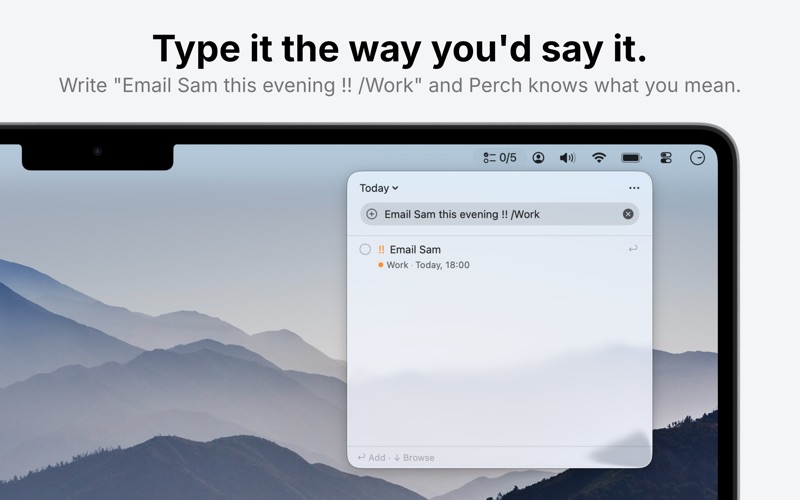
· Type it the way you'd say it: Write "Email Sam tomorrow at 9am" or "Water the plants every Monday" and Perch understands the date, time, and repeat on its own. Add "1 week early" and it sets the early reminder too. Set a priority or drop it into a list from the same line. Editing speaks plain words too: type "tomorrow 9am" right in the title. Perch reads your language and English, eleven languages in all.

· And it forgives how you type: "tmrw", "everyday" and "at ten" all land where you expect. List names match without their accents, and when you nearly get a word right, Perch asks what you meant. Type "/" to see every list as its coloured badge, or "/w" for just the ones that match, so no list name has to be remembered exactly.

· Never miss the run-up: give any dated reminder an early alert from its own menu, from five minutes to a month before, and the row wears it as a bell. Perch keeps the ones you set in Reminders.app and dims a lead whose moment has already gone by, exactly as Reminders does.

· Built for the keyboard: Open with your hotkey, type to search or add, arrow to move, space to complete, return to edit, escape to dismiss. Undo with ⌘Z, and press ⌘/ for the shortcuts worth knowing. You never have to reach for the mouse.

· Handle several at once: Hold Shift or Command to pick out more than one, then complete, move, delete, or change their priority together. One Undo takes it all back.

· See exactly what matters: Switch between Today, Upcoming, All, or any of your lists, and sort by due date, priority, title, or date created. The menu bar can show a live count, your next reminder, or how you are doing: "6/10" is six done out of the day's ten.

· Make it yours: Choose which lists Perch shows, pick a size, and slide Perch from see-through to solid.

Thoughtful details:
· Global hotkey works in any app, fully customisable
· Coloured list dots and overdue highlighting
· Completed items linger briefly, so a mis-tap is easy to undo
· Launch at login, always ready
· Opens instantly, right under the menu bar; no Dock icon, no clutter

Private by design: Perch has no account and makes no network connections. Your reminders never leave your Mac except through your own iCloud sync, exactly as Apple's Reminders already handles them. Nothing is collected, tracked, or sent anywhere.

Requires access to Reminders. macOS 14 or later.