Plan your day without bouncing between a calendar, a todo app, and group chat.

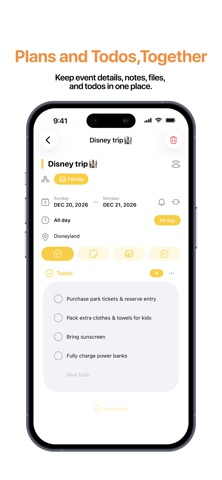
Bricks Calendar brings events, todos, shared plans, and conversations into one calm, color-coded view. Each Brick is a space for one part of life—personal plans, a partner, family, study, or work. Keep it private, or invite the people who need to be there.

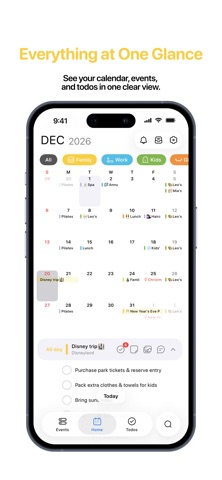
SEE EVERYTHING AT A GLANCE
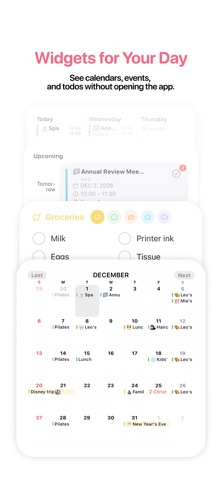
• Scan your month and agenda together
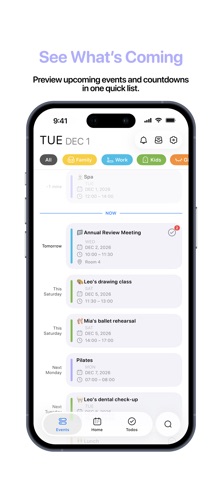
• Preview upcoming events and countdowns
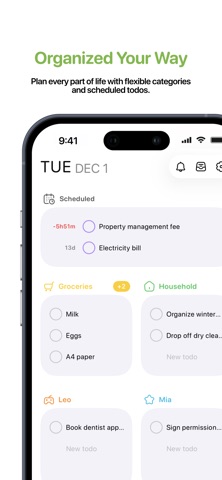
• Keep scheduled todos and flexible lists beside your calendar
• Add repeating events and todos, reminders, notes, photos, files, and links

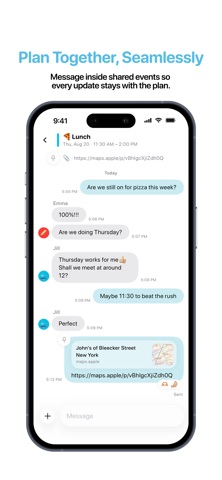
PLAN TOGETHER
• Share a Brick with edit or view-only access
• Keep todos and updates with the event they belong to
• Message inside an event instead of searching through separate chats
• Get notified when shared plans change

MAKE IT YOURS
• Organize plans with colors and icons
• Link supported Apple Calendars and manage them from Bricks
• Choose Home Screen widgets for calendars, events, and todos
• Use Bricks in English, Traditional Chinese, Japanese, Korean, or German

BRICKS PRO
Create and manage your own Bricks with Bricks Pro. New accounts can try Bricks Pro for 7 days without a payment method. People invited to a shared Brick can view it and message for free. Editing Brick or event content requires Bricks Pro and edit access. Apple Family Sharing shares subscription eligibility only; each Brick still needs its own invitation.

Privacy: https://bricks-calendar.com/privacy/
Terms: https://bricks-calendar.com/terms/
Support: https://bricks-calendar.com/support/